Save it once
Create a snippet for an email reply, meeting note, link, or other text you reuse.
 Text Expanderby ByteForth
Save the replies you write every day. Give each one a short shortcut, then expand it in supported Chrome text fields.
Explore Free & ProPro purchases start in the extension after Google sign-in. Free text expansion works without an account.
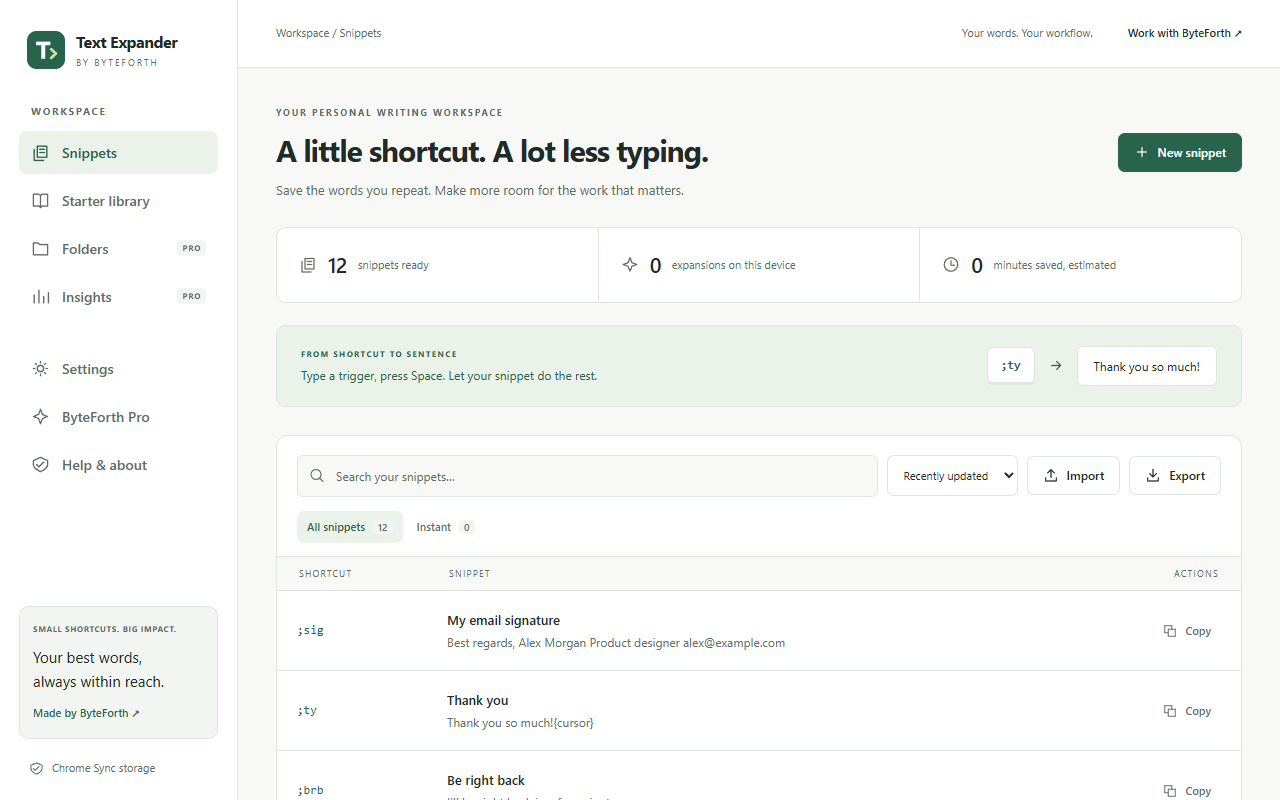
Create a snippet for an email reply, meeting note, link, or other text you reuse.
Give it a memorable trigger like ;hello. Type the trigger and your chosen delimiter to expand it.
Find snippets from the quick-insert palette, or copy one from the popup whenever you need it.
Sign in with Google to identify your account, link your Pro purchase and restore access. We use your Google account identifier, email address and basic profile information for these account features. Google sign-in is optional for Free and required before a new Pro purchase.
We do not request access to your Gmail, Google Drive or contacts.
Ordinary expansion happens in your browser. Snippets use Chrome storage with Sync where available. Optional Pro cloud backups and AI requests send only the content you explicitly choose to submit.
Read the privacy policyWorks in standard text fields and many editable web pages where Chrome permits extensions. Some complex editors and restricted browser pages do not support insertion; you can copy and paste instead.